


1
/
of
1
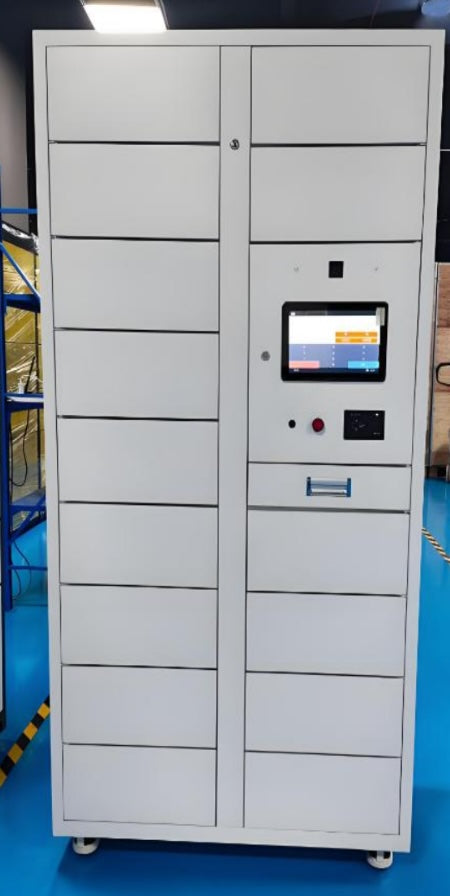
RIFE RFID Smart Medical Inventory Cabinet
RIFE RFID Smart Medical Inventory Cabinet
Regular price
Rs. 500,000.00
Regular price
Sale price
Rs. 500,000.00
Shipping calculated at checkout.
RIFE RFID SMART MEDICAL INVENTORY CABINET
Real-time control of implants, devices and high-value hospital inventory
Hospitals manage a wide range of valuable medical products across operating rooms, cath labs, procedure rooms, implant stores and clinical departments.
When inventory is controlled using spreadsheets, manual registers or periodic physical counts, hospitals may experience:
- Unrecorded item removals
- Products approaching expiry without timely action
- Difficulty locating urgently required inventory
- Excess stock in one department and shortages in another
- Limited visibility of consigned inventory
- Time-consuming manual stock counts
- Incomplete user and transaction records
- Delayed replenishment
- Avoidable inventory write-offs
The RIFE RFID Smart Medical Inventory Cabinet replaces fragmented manual processes with secure, automated and item-level inventory visibility.
Every RFID-tagged item can be associated with its product information, cabinet location, user access and transaction history. The software dashboard provides an up-to-date view of available, issued, returned, expiring and recalled inventory.
Key benefits
- Real-time inventory visibility
- Automatic RFID item identification
- Controlled access for authorised users
- Item-level issue and return history
- Expiry and recall alerts
- Reduced manual stock counting
- Improved consignment-stock management
- Faster inventory reconciliation
- Better stock utilisation
- Searchable transaction audit trail
- Optional AI-assisted inventory analytics
- Integration options for hospital systems
What can the cabinet manage?
The RIFE RFID Smart Medical Inventory Cabinet can be configured for selected high-value and operationally important inventory, including:
- Surgical implants
- Stents
- Catheters
- Balloons
- Valves
- Orthopaedic implants
- Dental implants
- Surgical meshes
- Grafts and selected tissue products
- Surgical consumables
- Interventional radiology products
- Cardiology devices
- Ophthalmic products
- Diagnostic devices
- High-value laboratory products
- Consigned medical inventory
- Individually identifiable medical equipment
Product suitability depends on packaging, dimensions, storage requirements, RFID-tag compatibility and hospital policy.
Items requiring refrigeration, freezing, controlled humidity or specialised regulatory storage require a separately engineered storage solution.
How the RFID smart cabinet works
1. Each inventory item is identified
A compatible RFID tag is assigned to each product that requires automatic item-level tracking.
The RFID record may be associated with:
- Product description
- Item code
- Manufacturer
- Serial number
- Batch or lot number
- Expiry date
- Supplier
- Ownership status
- Consignment status
- Storage location
2. The authorised user authenticates
The user identifies themselves before opening the cabinet.
Available authentication options may include:
- RFID employee card
- PIN
- QR code
- Fingerprint
- Facial recognition
- Existing hospital access credential
Access permissions can be configured according to employee, department, role or inventory category.
3. The cabinet reads the stored inventory
Integrated RFID readers and antennas detect compatible tagged items stored inside the cabinet.
The system can compare each reading with the previous inventory position to identify products that have been:
- Added
- Removed
- Returned
- Transferred
- Replenished
- Marked for attention
4. The transaction is recorded
When the cabinet is closed, the software updates the inventory position and associates the transaction with the authenticated user, date, time and cabinet.
5. The dashboard updates
Authorised administrators can review current stock, user activity, overdue items, expiry risks and inventory discrepancies.
Core product features
Automatic item-level RFID tracking
The cabinet identifies compatible tagged items without requiring every item to be scanned individually using a barcode reader.
This reduces dependence on manual stock counting and improves the speed of inventory updates.
Secure user access
Electronic access control helps ensure that only authorised personnel can open the cabinet.
Permissions can be configured for:
- Individual users
- Departments
- Clinical roles
- Inventory categories
- Selected cabinets
- Time-based access
Real-time inventory dashboard
The management dashboard can display:
- Current cabinet inventory
- Available items
- Removed items
- Returned items
- User transaction history
- Low-stock products
- Products approaching expiry
- Expired items
- Recalled products
- Inventory discrepancies
- Inventory value
- Usage by department
- Stock movement by date
Expiry management
Expiry information can be associated with each tagged item.
The system can help administrators identify:
- Products approaching expiry
- Expired products
- Stock requiring rotation
- Items that should be transferred to a higher-use location
- Products that should not be issued
Recall management
Where recall information is available and integrated into the system, affected batch or lot numbers can be identified more quickly.
Administrators can locate the relevant product and take action according to the hospital’s recall procedure.
Consignment-stock visibility
The cabinet can support management of supplier-owned or consigned inventory.
Depending on software permissions, hospitals and suppliers can maintain visibility of:
- Available consigned stock
- Products removed
- Products consumed
- Replenishment requirements
- Items approaching expiry
- Inventory by supplier
- Transaction history
Low-stock and replenishment alerts
Minimum stock levels can be configured for selected products.
The system can notify responsible staff when inventory falls below the defined quantity.
Where integration is available, inventory information may also support purchasing or replenishment workflows.
Audit trail
The cabinet maintains a digital history of inventory and user activity.
Reports may be filtered by:
- Product
- User
- Cabinet
- Department
- Date
- Supplier
- Batch or lot
- Transaction type
Optional AI-supported analytics
Depending on the software configuration, inventory data can be analysed to identify patterns such as:
Frequently used products
Slow-moving inventory
- Excess stock
- Repeated stockouts
- Products with high expiry risk
- Changes in departmental demand
- Abnormal inventory movement
- Opportunities for stock redistribution
AI-supported recommendations depend on the accuracy and completeness of the captured inventory data.
Inventory reports and analytics
The software can be configured to provide reports covering:
Stock-level reporting
View current quantities by cabinet, product, department or location.
Expiry-risk reporting
Identify products that are approaching expiry within a selected period.
Usage analysis
Review inventory consumption according to product, department, procedure area or time period.
Removed-item reporting
See which products were removed, when they were removed and which user accessed the cabinet.
Consignment reporting
Separate hospital-owned inventory from supplier-owned or consigned stock.
Slow-moving inventory
Identify products that remain unused for extended periods.
Replenishment reporting
View products below minimum stock level and items requiring replacement.
Inventory discrepancy reporting
Highlight differences between expected and detected inventory.
Designed for high-value hospital inventory
Cath labs and cardiology departments
Manage stents, balloons, catheters, valves and selected interventional products.
Operating rooms
Control implants, surgical devices and high-value consumables used during procedures.
Orthopaedic departments
Track implants, plates, screws and selected procedure-specific inventory.
Interventional radiology
Monitor catheters, filters, guidewires and other individually identifiable products.
Implant stores
Maintain central visibility of inventory stored for multiple departments or procedures.
Ophthalmology
Manage lenses, implants and selected high-value ophthalmic products.
Dental and maxillofacial departments
Control dental implants, graft products and procedure-specific inventory.
Laboratories
Track selected high-value reagents, devices, diagnostic kits and individually tagged products.
Cabinet configuration options
| Configuration area | Available options |
|---|---|
| Cabinet format | Standalone or modular cabinet system |
| Internal layout | Adjustable shelves, fixed shelves, drawers or customised compartments |
| RFID technology | Project-specific UHF RFID configuration |
| User authentication | RFID card, PIN, QR code, fingerprint or facial recognition |
| Cabinet access | Electronic lock with authorised access |
| Display | Integrated touchscreen or external management interface |
| Connectivity | LAN, Wi-Fi or project-specific network connection |
| Software | Local, server-based or cloud-connected configuration |
| Alerts | Low stock, expiry, recall, access and inventory discrepancy |
| Reports | User, product, supplier, cabinet, expiry and transaction reports |
| Integration | ERP, HIS, MMIS, procurement or supplier systems where supported |
| Cabinet construction | Powder-coated sheet-metal cabinet |
| Door options | Solid or transparent door depending on configuration |
| Cabinet colour | Standard or customised finish |
| Power backup | Optional, depending on system architecture |
All features are subject to the final project configuration.
RFID design and performance
Reliable RFID performance depends on the complete system design.
Factors that must be evaluated include:
- Product packaging
- RFID tag type
- Tag placement
- Metal content
- Liquid-containing products
- Distance between tagged items
- Cabinet material
- Shelf arrangement
- Antenna positioning
- Number of products stored
- Environmental conditions
RIFE evaluates the actual products before finalising the RFID architecture.
A pilot test may be recommended for complex inventory containing metal, liquids, dense packaging or unusually shaped products.
Optional integrations
Depending on the hospital’s software infrastructure, integration may be developed with:
- Hospital information systems
- ERP platforms
- Materials-management systems
- Procurement software
- Electronic medical records
- Billing systems
- Supplier inventory systems
- Employee directories
- Access-control platforms
Integration scope, data fields and responsibilities must be finalised during project assessment.
Standard medical cabinet vs RFID smart cabinet
| Capability | Standard medical cabinet | RIFE RFID smart cabinet |
|---|---|---|
| Secure physical storage | Yes | Yes |
| Controlled electronic access | Optional | Yes |
| Automatic product identification | No | Yes |
| Item-level inventory status | Manual | RFID-based |
| User transaction history | Limited | Available |
| Expiry alerts | Manual | Available |
| Recall identification | Manual | Available |
| Consignment visibility | Manual | Available |
| Low-stock notification | No | Available |
| Inventory reports | Manual | Available |
| AI-supported analytics | No | Optional |
| System integration | Limited | Project-specific |
Implementation process
1. Inventory assessment
RIFE studies the products, packaging, quantities, dimensions and inventory value.
2. Workflow assessment
We review how products are received, stored, accessed, consumed, returned and replenished.
3. RFID testing
Representative products are tested to determine suitable RFID tags, placement and antenna design.
4. Cabinet configuration
The internal shelf, drawer or compartment arrangement is designed around the inventory.
5. Software configuration
Users, products, suppliers, alerts, reports and permissions are configured.
6. Integration
Required interfaces with hospital or supplier systems are defined and developed where applicable.
7. Pilot installation
The system is installed in a selected department and tested under actual operating conditions.
8. Training
Hospital administrators and authorised users are trained.
9. Review and expansion
RFID accuracy, user adoption and inventory results are reviewed before expanding to additional departments.
Frequently asked questions
What is an RFID smart medical inventory cabinet?
It is a secure cabinet that uses RFID technology to automatically identify and monitor compatible tagged medical products stored inside it.
Does every product require an RFID tag?
Every item requiring automatic item-level identification must have a compatible RFID tag.
Can the cabinet track implants individually?
Yes. Individually tagged implants can be associated with their product, batch, serial, lot and expiry information where these records are available.
Can RFID work inside a metal cabinet?
Yes, but the tag, antenna and cabinet design must be engineered carefully because metal can affect RFID performance.
Can the system track expiry dates?
Yes. Expiry alerts can be generated when expiry information is correctly associated with the tagged product.
Can the system identify recalled products?
Recall information can be matched to relevant batch or lot records where the required data and integration are available.
Can suppliers view consigned inventory?
Selected supplier access can be configured subject to hospital approval, software permissions and project scope.
Does the cabinet use artificial intelligence?
RFID performs item identification. Optional AI-assisted software can analyse the resulting inventory data for demand, expiry, stock-level and utilisation patterns.
Does the system track products after they leave the cabinet?
The cabinet records removal and return at the cabinet. Wider real-time location tracking requires additional RFID readers, mobile scanning or an RTLS infrastructure.
Can the cabinet be customised?
Yes. Cabinet dimensions, shelf arrangement, access method, display, software, reporting and integration can be configured around the project.
Is this cabinet suitable for medication dispensing?
This product is intended primarily for inventory identification and control. Patient-specific medication dispensing and controlled-drug management may require a separate automated dispensing-cabinet configuration.
Plan an RFID smart inventory pilot for your hospital
Share your inventory type, product quantities, packaging, expiry data, authorised users, department, reporting needs and existing hospital software. RIFE Medical will assess the cabinet design, RFID architecture, workflow and integration requirements.
Request an RFID Inventory Assessment | Explore RFID Inventory Solutions
Related resources: RFID inventory solutions for healthcare | Real-time hospital inventory management | RFID smart cabinets for hospitals in India
Share
Subscribe to our emails
Be the first to know about new collections and exclusive offers.
